
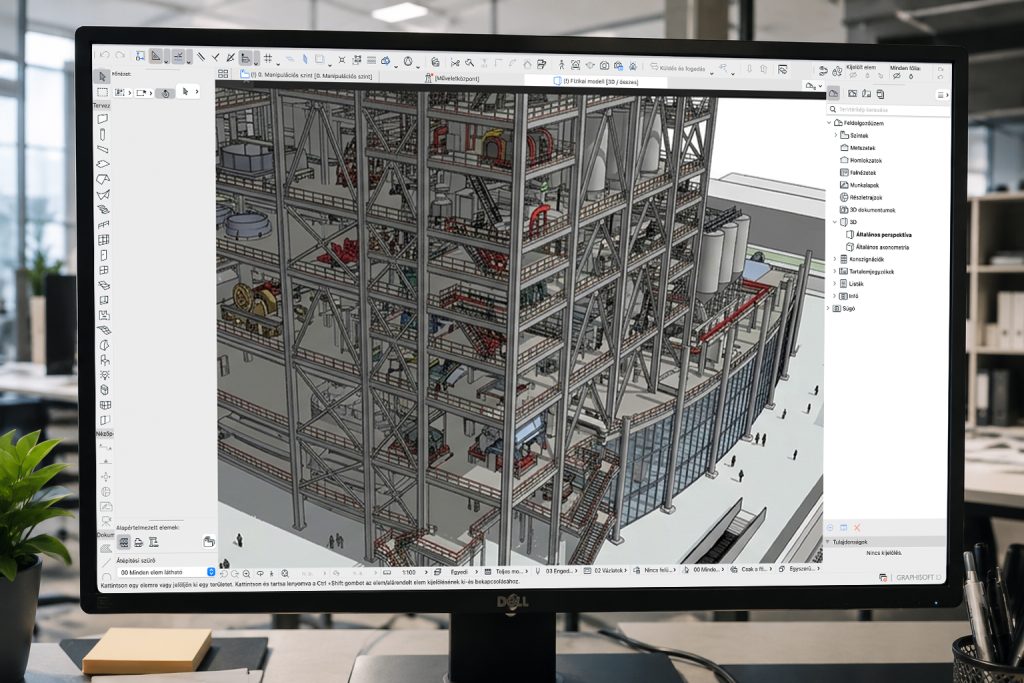
Earlier this week, one of our former partners reached out to us for help. Their Archicad documentation and model had gradually become unstable, eventually reaching the point where the project file could no longer be opened.
We were asked to investigate what might be causing the issues in this otherwise moderately sized project and to recommend improvements to their workflows, as well as to the way data exchange and data processing with specialist designers – including received drawings and models – were handled.
Assessment
During a one-day, on-site workshop, we assessed the collaboration between the architectural and specialist design teams and examined the structure of the project in question. The project involved an industrial building where the technology and structural design played a key role, with the architectural elements largely shaped around them. The development consists of two buildings divided into four logically separate sections, each with different structural characteristics. The project includes a combination of cast-in-place reinforced concrete, precast concrete and steel structures.
The architect and specialist designers exchange information through IFC files, making the correct handling of IFC data essential. Different structural systems are designed by different teams, which means that the varying level of detail and configuration of the received files also requires different approaches to collaboration.
In addition, the structural models received from specialist designers – particularly the steel structures – required a carefully planned process over time. First, a structurally engineered steel model is created and referenced in the architectural project. This model is then updated by the steel detailing team with the final geometries and connections developed during prefabrication and fabrication design.
The problem
As might be expected, the complexity uncovered during the assessment created several opportunities for problems to arise. In this case, the main issue was caused by an IFC model of one of the steel structures – a technological tower – which suffered from several configuration deficiencies.
As a result, when the IFC was imported into Archicad, every element of the model – despite having ten logical storeys – was placed on the zero level as “undefined”. In addition, elements were not organised into layers by type or according to any other logical structure. After the IFC was converted, the intermediate Archicad module assigned a separate layer to every single element. Due to the relatively high number of modelled elements – including bolts, diaphragms, stairs and railings – this resulted in more than five thousand individual layers.
When this module was hotlinked into the main Teamwork project, it brought this enormous amount of unnecessary data with it.
There were also smaller issues that reduced efficiency and increased the risk of errors in the IFC exchange process. These included the absence of a properly defined Survey Point and problems with managing libraries created during IFC conversion.
Without a correctly positioned Survey Point, every external file has to be manually aligned after insertion, significantly increasing the possibility of errors.
Solutions
Input-dependent module strategy
Files received from different sources, created with different approaches and for different purposes, were not incorporated into the project using a single method. Instead, we defined the appropriate workflow individually based on the quality and content of the incoming data, as well as how each file would be used later in the project.
The module strategy also included establishing the correct logic for managing hotlink modules and IFC libraries. This was defined with the project structure, subsequent design processes and Teamwork server performance in mind.
IFC files that had already been properly prepared and could be imported cleanly were added directly to the project as hotlinked modules. The layers and identifiers required for proper module management were configured accordingly. This made it possible to display the required content and visual information in the drawings using just a few simple Graphic Overrides.
By referencing IFC files directly as hotlinked modules where appropriate, we can reduce both the size and complexity of the Teamwork project, making project management faster and more efficient. Wherever possible, it is worth referencing the IFC directly as a module to avoid potential data loss or modification caused by unnecessary conversions.
This also enables information to be exchanged between design teams without loss of data. More importantly in many cases, responsibility for the content of that data remains clearly defined. If an IFC received from a specialist designer is converted and broken down into editable elements, for example, it can no longer be guaranteed that the architect has not intentionally or unintentionally modified the information received.
Preparing incoming files
In the case of the IFC file responsible for the crashes, the layer structure had to be reorganised and the one-layer-per-element logic eliminated. Using a naming convention defined together with the designers, we reduced the number of layers to eight. We then manually reassigned every element to the appropriate layer using conditional selections and IFC properties, before removing the unnecessary layers from both the module and the main project file.
Creating and harmonising storeys across the different files was another important task, ensuring that the multi-storey tower would be displayed correctly in every view and on every relevant storey.
Testing
The first half of the day was dedicated to assessing the project and defining the appropriate strategies, followed by testing and implementation. In a situation like this – essentially a digital firefighting exercise – the goal is to establish a safe way forward, define the required workflows and demonstrate the proposed solutions in practice. This means we did not process every file or every individual element.
Instead, we implemented the settings required for safe and efficient progress, allowing the design team to continue working independently afterwards.
Lessons learned
During this single day of troubleshooting, we encountered at least four or five unusual and relatively rare issues caused by interactions between incoming data and the live project. Investigating these problems made it particularly clear how important it is to define workflows as early as possible.
In every similar project, it is essential to establish precise data exchange processes from the very beginning and to develop an appropriate data import strategy – potentially including a module strategy – based on the quality and structure of the incoming files. There is no single universally correct module strategy. The most efficient solution always depends on the files received and the project objectives.
With the right processes in place, unexpected interruptions and crashes can be avoided during the design phase – issues that, in more serious cases, could prevent the delivery of documentation or put project deadlines at risk.
Archicad Task Force 🙂
The Brick+Data team is prepared to step in even when problems become urgent. In this case, we resolved an issue that had brought work to a standstill for approximately one week through a single day of on-site assessment and training. We also developed recommendations and a strategy to ensure that the project could continue smoothly.
Brick+Data Academy and Training
Prevention is far more effective than firefighting. The Brick+Data team provides training across a wide range of topics, helping teams establish the foundations required for efficient and trouble-free work.
Alongside BIM workflows, our Archicad- and Revit-specific courses provide a solid foundation. Following an assessment of specific needs, we can also develop teams through targeted training tailored to the challenges and requirements of a particular project.